
Embedded Studio in Vite
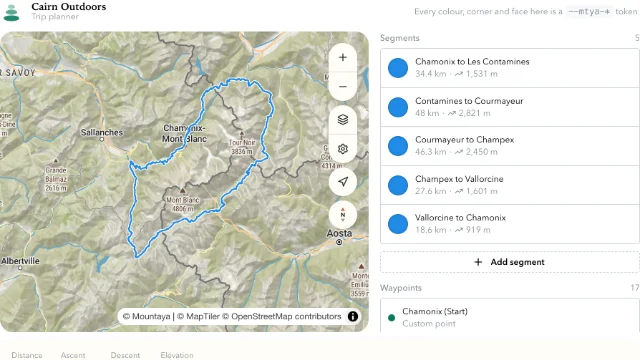
The full Mountaya editor in a Vite and React app. The page fetches a session token from your server and renews it before it expires.
The packages are not on npm yet
The @mountaya/* packages are coming to npm. Until they are published, the install commands on these pages fail with a 404.
Every file the app needs, as it builds in the SDK repository.
From examples/studio-vite/package.json
{
  "name": "@mountaya/example-studio-vite",
  "version": "0.0.0",
  "private": true,
  "license": "MIT",
  "description": "A Vite application mounting the Mountaya studio, exactly as the README shows it.",
  "type": "module",
  "scripts": {
    "build": "vite build",
    "dev": "vite",
    "lint": "tsc --noEmit"
  },
  "dependencies": {
    "@mountaya/client": "0.1.0",
    "@mountaya/client-react": "0.1.0",
    "@mountaya/elements": "0.1.0",
    "@mountaya/elements-react": "0.1.0",
    "@mountaya/studio": "0.1.0",
    "@mountaya/studio-react": "0.1.0",
    "@tanstack/react-query": "^5",
    "maplibre-gl": "6.18.0",
    "react": "19.3.1",
    "react-dom": "19.3.1"
  },
  "devDependencies": {
    "@types/react": "19.3.0",
    "@types/react-dom": "19.3.0",
    "@vitejs/plugin-react": "6.1.2",
    "typescript": "7.0.2",
    "vite": "8.3.4"
  }
}From examples/studio-vite/vite.config.ts
import react from "@vitejs/plugin-react";
import { defaultClientConditions, defineConfig } from "vite";

/**
 * The example builds against the packages' SOURCE, not their `dist`.
 *
 * `@mountaya/source` is the condition every package in this family publishes its own TypeScript
 * under, and naming it here is what makes this example a gate rather than a demo: a change to a
 * component is compiled by this build on the next run, with no `npm run build` in between. A
 * demo pointed at `dist` would go on succeeding against whatever was built last, which is the
 * failure mode an example exists to catch.
 *
 * It is also the one thing in this file a consumer should NOT copy. Their bundler resolves the
 * published `dist` under the default conditions, which is what `scripts/packaging.test.mjs`
 * holds every package to (its "resolves to source only under the scoped condition" rule).
 */
export default defineConfig({
  plugins: [react()],
  resolve: {
    // Vite replaces its default conditions with a list a config names, so they follow the
    // condition: without them a dependency loses `module`, `browser` and `development|production`.
    conditions: ["@mountaya/source", ...defaultClientConditions],
  },
});From examples/studio-vite/index.html
<!doctype html>
<html lang="en">
  <head>
    <meta charset="utf-8" />
    <meta content="width=device-width, initial-scale=1" name="viewport" />
    <title>Mountaya studio</title>
  </head>
  <body>
    <!-- The studio fills whatever it is given, so the root gets the viewport. -->
    <div id="root" style="block-size: 100dvh"></div>
    <script src="/src/main.tsx" type="module"></script>
  </body>
</html>From examples/studio-vite/src/main.tsx
import { StrictMode } from "react";
import { createRoot } from "react-dom/client";

import "@mountaya/studio-react/styles.css";

import { Studio } from "./Studio.js";

/**
 * The mount, which is all this file is.
 *
 * The stylesheet is here rather than beside the component because it is an application-level
 * decision, one import, once, wherever the studio is mounted, and putting it in the component
 * would make it look like something to repeat per surface.
 *
 * StrictMode is on deliberately. It double-invokes effects in development, which is exactly
 * what finds a map, a store subscription or a collaboration session that does not survive being
 * mounted twice, and a consumer's application will have it on.
 */
const container = document.querySelector("#root");

if (container === null) {
  throw new Error("index.html has no #root to mount into.");
}

createRoot(container).render(
  <StrictMode>
    <Studio />
  </StrictMode>,
);From examples/studio-vite/src/Studio.tsx
import { useState } from "react";

import { Mountaya } from "@mountaya/client/browser";
import { useSessionToken } from "@mountaya/client-react";
import { frElementsStrings } from "@mountaya/elements/i18n/fr";
import { frStudioStrings } from "@mountaya/studio/strings/fr";
import { MountayaStudio, MountayaStudioHost, type StudioI18nConfig } from "@mountaya/studio-react";

const PUBLISHABLE_KEY = "pk_…";

// English is built in, and every other language is an entry of its own, so a page that reads in
// English loads no French. This page reads in French: it imports the studio's words and the map
// chrome's, and hands both over once, at module scope, where their identity holds.
const french: StudioI18nConfig = {
  language: "fr",
  studioTranslations: { fr: frStudioStrings },
  translations: { fr: frElementsStrings },
};

// Every request the studio makes, its writes, its map and its search, routing and elevation
// profile, takes a session token beside the key, minted for the studio's own surface. Minting one
// needs the secret key, so your server does it: this endpoint calls `POST /v1/sessions` with
// `{ publishable_key, surface: "studio-embedded", user_id }` and returns the
// `{ token, expires_at, user_id }` it receives. The studio refuses a token minted for any other
// surface, and what it draws and asks under this one is never counted toward your organization's
// limits. `user_id` is the member your own sign-in vouches for, read from your server's session
// and never from the request: every write the studio makes acts as the user the token names, and
// no header names one. The hook refreshes the token before it expires. An answer that is not a
// success rejects, so the hook reports it and asks again, where a body read as it came would be a
// session with no token in it.
const mintSession = async () => {
  const response = await fetch("/api/mountaya-session");
  if (!response.ok) {
    throw new Error(`The session endpoint answered ${response.status}.`);
  }

  return response.json();
};

// The key is stated once, here, and the client is built once over `session`: the studio renders
// once the first token lands, and each refresh reaches the next request and the next tile with
// nothing rebuilt. The map derives its own tile transform from this client (the
// credential, the tile origin allowed to receive it, and the language its labels are rendered
// in), so the French chrome below arrives over French tile labels.
export const Studio = () => {
  const { session } = useSessionToken({ mint: mintSession });
  const [mountaya] = useState(
    () =>
      new Mountaya({
        credential: { publishableKey: PUBLISHABLE_KEY, sessionToken: session },
      }),
  );

  return (
    <MountayaStudioHost client={mountaya} i18n={french}>
      <MountayaStudio />
    </MountayaStudioHost>
  );
};Embedded Studio comes with an agreement.
Replace pk_… and user_… in src/Studio.tsx with a key carrying the studio-embedded scope and a member's id. Serve /api/mountaya-session from your backend, as the studio quickstart shows. Drop the resolve.conditions from vite.config.ts: they build the example against the SDK's source in its repository.
npm install
npm run devThe same app is examples/studio-vite in the SDK repository.