
Vite map with an itinerary
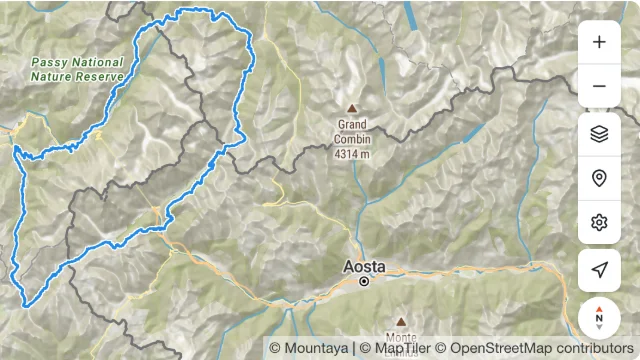
One itinerary on a map with its controls, in a Vite and React app. The session token renews while the map stays mounted, and every refusal reaches the page.
The packages are not on npm yet
The @mountaya/* packages are coming to npm. Until they are published, the install commands on these pages fail with a 404.
Every file the app needs, as it builds in the SDK repository. The dev server answers /api/mountaya-session with your secret key, standing in for your backend.
From examples/elements-react-map/package.json
{
  "name": "@mountaya/example-elements-react-map",
  "version": "0.0.0",
  "private": true,
  "license": "MIT",
  "description": "A Vite application rendering a map and an itinerary, under a session token that rotates while the map is mounted.",
  "type": "module",
  "scripts": {
    "build": "vite build",
    "dev": "vite",
    "lint": "tsc --noEmit"
  },
  "dependencies": {
    "@mountaya/client": "0.1.0",
    "@mountaya/client-react": "0.1.0",
    "@mountaya/elements": "0.1.0",
    "@mountaya/elements-react": "0.1.0",
    "@tanstack/react-query": "^5",
    "maplibre-gl": "6.18.0",
    "react": "19.3.1",
    "react-dom": "19.3.1"
  },
  "devDependencies": {
    "@types/react": "19.3.0",
    "@types/react-dom": "19.3.0",
    "@vitejs/plugin-react": "6.1.2",
    "typescript": "7.0.2",
    "vite": "8.3.4"
  }
}From examples/elements-react-map/vite.config.ts
import react from "@vitejs/plugin-react";
import { defaultClientConditions, defineConfig, loadEnv, type Plugin } from "vite";

/**
 * Answers the page's `/api/mountaya-session` from the dev server, standing in for your backend.
 *
 * Minting a session token takes the secret key, and a secret key never reaches a browser: the
 * page asks a server for a token, and that server holds the key. While `vite` serves this
 * application, the dev server is that server. It reads the secret key from its own environment,
 * and Vite hands a page only the variables whose name starts with `VITE_`, so the secret key is
 * in no bundle.
 *
 * The answer is the session `POST /v1/sessions` returns, taken out of the `data` it arrives in:
 * `{ token, expires_at, user_id }`, which is what `useSessionToken`'s `mint` resolves with. The
 * session script the embed wizard copies under `require_session_token` reads this shape and the
 * API's own `{ data: { token, expires_at } }` alike, so the same endpoint answers a hosted embed's
 * page too. A built application has no dev server: its own backend serves the same address.
 *
 * The mint names no user, so the token reads what the key alone does: the published itinerary,
 * and no private or unpublished one. It still matters, since an organization that requires a
 * session token is answered nothing without one. To read a member's drafts, a backend adds
 * `user_id`, the member it signed in, read from its own session and never from the request.
 *
 * @param env The dev server's environment, as `loadEnv` reads it.
 */
const sessionEndpoint = (env: Record<string, string>): Plugin => ({
  configureServer(server) {
    server.middlewares.use("/api/mountaya-session", (_request, response) => {
      const answer = (status: number, body: unknown): void => {
        response.statusCode = status;
        response.setHeader("Content-Type", "application/json");
        response.end(JSON.stringify(body));
      };

      const publishableKey = env.VITE_MOUNTAYA_PUBLISHABLE_KEY;
      const secretKey = env.MOUNTAYA_SECRET_KEY;
      if (publishableKey === undefined || secretKey === undefined) {
        answer(500, {
          error: "Set VITE_MOUNTAYA_PUBLISHABLE_KEY (pk_…) and MOUNTAYA_SECRET_KEY (sk_…).",
        });

        return;
      }

      // Imported at the first mint and not at the top of this file, so `vite build` loads no
      // client into the process that only bundles.
      import("@mountaya/client")
        .then(({ Mountaya }) =>
          new Mountaya({ credential: { secretKey } }).admin.sessions.postSession({
            body: { publishable_key: publishableKey },
          }),
        )
        .then(({ data: session }) => answer(200, session))
        .catch((error: unknown) => answer(502, { error: String(error) }));
    });
  },
  name: "mountaya-session",
});

/**
 * The example builds against the packages' SOURCE, not their `dist`.
 *
 * `@mountaya/source` is the condition every package in this family publishes its own TypeScript
 * under, and naming it here is what makes this example a gate: a change to `MapView` or to the
 * client's credential is compiled by the next build of this application, with no build of the
 * packages in between. An application pointed at `dist` goes on succeeding against whatever was
 * built last.
 *
 * It is the one thing in this file a consumer does not copy. Their bundler resolves the published
 * `dist` under the default conditions, which is what `scripts/packaging.test.mjs` holds every
 * package to.
 */
export default defineConfig(({ mode }) => ({
  // Every variable, the unprefixed ones included: the endpoint above runs in the dev server
  // and reads the secret key there.
  plugins: [react(), sessionEndpoint(loadEnv(mode, ".", ""))],
  resolve: {
    // Vite replaces its default conditions with a list a config names, so they follow the
    // condition: without them a dependency loses `module`, `browser` and `development|production`.
    conditions: ["@mountaya/source", ...defaultClientConditions],
  },
}));From examples/elements-react-map/index.html
<!doctype html>
<html lang="en">
  <head>
    <meta charset="utf-8" />
    <meta content="width=device-width, initial-scale=1" name="viewport" />
    <title>Mountaya: an itinerary on a map</title>
    <style>
      body {
        margin: 0;
      }

      /* What the page reports sits over the map's lower edge, where the map leaves it room. */
      [role="alert"] {
        position: absolute;
        inset: auto 0 0;
        padding: 8px 16px;
        margin: 0;
        background: #fff;
      }
    </style>
  </head>
  <body>
    <!-- The map fills its parent and the controls sit on its edges, so the root is given the
         viewport's height and is the box the controls are placed in. -->
    <div id="root" style="block-size: 100dvh; position: relative"></div>
    <script src="/src/main.tsx" type="module"></script>
  </body>
</html>From examples/elements-react-map/src/env.d.ts
/**
 * The two variables this application reads, typed as what Vite hands over: a string where the
 * variable was set when the dev server or the build started, and `undefined` where it was not.
 *
 * Vite types every `import.meta.env` member it does not know as `any`. Declared here, a misspelt
 * name is a compile error and an unset variable is a case `src/main.tsx` has to answer.
 */
interface ImportMetaEnv {
  /** The itinerary to draw: the id in its Map Studio address. */
  readonly VITE_MOUNTAYA_ITINERARY_ID?: string | undefined;
  /** The publishable key (`pk_…`) every request of the page is sent with. */
  readonly VITE_MOUNTAYA_PUBLISHABLE_KEY?: string | undefined;
}From examples/elements-react-map/src/main.tsx
import { StrictMode } from "react";
import { createRoot } from "react-dom/client";

import "@mountaya/elements-react/styles.css";

import { ItineraryMap } from "./ItineraryMap.js";

/**
 * The mount, the one stylesheet and the two values the page is configured with.
 *
 * `@mountaya/elements-react/styles.css` carries the renderer's rules and then the elements' own,
 * so it is the only stylesheet import of this application. It sits here and not beside the
 * component because it is imported once, where the application mounts.
 *
 * Vite writes both variables into the bundle as it builds or serves, so each has a placeholder
 * to fall back on: a build with neither set still compiles the whole page, and the page then
 * says which request the placeholder failed.
 *
 * StrictMode is on deliberately. It builds, tears down and rebuilds the map on a development
 * mount, which is what finds a map or a token subscription that does not survive it, and an
 * application of yours has it on.
 */
const container = document.querySelector("#root");
const publishableKey = import.meta.env.VITE_MOUNTAYA_PUBLISHABLE_KEY ?? "pk_…";
const itineraryId = import.meta.env.VITE_MOUNTAYA_ITINERARY_ID ?? "itin_…";

if (container === null) {
  throw new Error("index.html has no #root to mount into.");
}

createRoot(container).render(
  <StrictMode>
    <ItineraryMap itineraryId={itineraryId} publishableKey={publishableKey} />
  </StrictMode>,
);From examples/elements-react-map/src/ItineraryMap.tsx
import { useEffect, useState } from "react";

import { Mountaya } from "@mountaya/client/browser";
import { useSessionToken } from "@mountaya/client-react";
import { MapControls, MapView, useMountayaMap } from "@mountaya/elements-react";

/**
 * Mints the session token. Minting takes the secret key, so your server does it: this endpoint
 * calls `POST /v1/sessions` with `{ publishable_key }` and returns the
 * `{ token, expires_at, user_id }` it receives. The hook asks again before the token expires, and after a mint that rejects.
 */
const mintSession = async () => {
  const response = await fetch("/api/mountaya-session");
  if (!response.ok) {
    throw new Error(`The session endpoint answered ${response.status}.`);
  }

  return response.json();
};

/** What a rejected call says, as a sentence the page can show. */
const messageOf = (error: unknown): string =>
  error instanceof Error ? error.message : String(error);

/** A call for one itinerary that rejected, and what it said. */
interface Rejection {
  readonly itineraryId: string;
  readonly message: string;
}

interface DrawnItineraryProps {
  readonly itineraryId: string;
  /** Hears the call for `itineraryId` reject. */
  readonly onError: (rejection: Rejection) => void;
}

/** Draws the itinerary on the map it is placed in, and frames it. */
const DrawnItinerary = ({ itineraryId, onError }: DrawnItineraryProps) => {
  const map = useMountayaMap();

  useEffect(() => {
    if (map === null) {
      return;
    }

    // One call draws the itinerary and frames it: no closer than `maxZoom` however short it is,
    // and with no ease, since this is where the itinerary opens and not a move a reader asked
    // for. The call is yours and rejects as calls do: `onError` and `onAccessRequired` on the map
    // carry only what no call of yours could reject.
    const drawing = new AbortController();
    map
      .setItinerary(itineraryId, {
        fit: { duration: 0, maxZoom: 15, padding: 48 },
        signal: drawing.signal,
      })
      .catch((error: unknown) => {
        // Aborting withdraws the call, which then rejects with the abort: an itinerary that is
        // not the one on screen is neither drawn nor framed, and says nothing about this one.
        if (!drawing.signal.aborted) {
          onError({ itineraryId, message: messageOf(error) });
        }
      });

    return () => drawing.abort();
  }, [itineraryId, map, onError]);

  return null;
};

interface ItineraryMapProps {
  readonly itineraryId: string;
  readonly publishableKey: string;
}

/**
 * The itinerary's map, under a session token that rotates.
 *
 * One client for the component's life, built over `session`: a request made before the first
 * token waits for it, so the itinerary's first read is the token's: the draft for a token naming
 * a member, and the last publication for one naming nobody. A refresh reaches the next tile and
 * the next read with no client and no map rebuilt. The map mounts at once, and its children render
 * on it once it is ready, under a provider that states it.
 */
export const ItineraryMap = ({ itineraryId, publishableKey }: ItineraryMapProps) => {
  const { error, session } = useSessionToken({ mint: mintSession });
  const [mountaya] = useState(
    () => new Mountaya({ credential: { publishableKey, sessionToken: session } }),
  );
  // A call for the itinerary on screen rejects, and the map reports a request of its own. The
  // first is about one itinerary and goes with it; the second stays until the map reports again.
  const [rejection, setRejection] = useState<Rejection | null>(null);
  const [report, setReport] = useState<string | null>(null);

  // A mint that fails is tried again on a schedule, and says so until one lands.
  const problem =
    (rejection?.itineraryId === itineraryId ? rejection.message : null) ??
    report ??
    (error === undefined ? null : messageOf(error));

  return (
    <>
      <MapView
        client={mountaya}
        onAccessRequired={({ status, url }) => setReport(`The API answered ${status} for ${url}.`)}
        onError={(failure) => setReport(failure.message)}
      >
        <MapControls compass geolocate layers preferences zoom />
        <DrawnItinerary itineraryId={itineraryId} onError={setRejection} />
      </MapView>
      {problem === null ? null : <p role="alert">{problem}</p>}
    </>
  );
};Drop the resolve.conditions from vite.config.ts: they build the example against the SDK's source in its repository. Then run it with a key carrying the tiles and publishing scopes:
npm install
VITE_MOUNTAYA_PUBLISHABLE_KEY=pk_your_publishable_key \
VITE_MOUNTAYA_ITINERARY_ID=0b6d1a4e-6d3f-4f7a-9c2e-1f0a5b8c3d21 \
MOUNTAYA_SECRET_KEY=sk_your_secret_key \
npm run devThe same app is examples/elements-react-map in the SDK repository.